

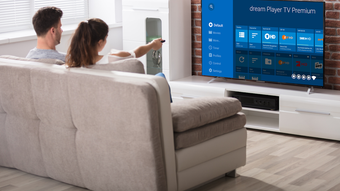
Description
Download dream Player TV – dream Player for FritzBox, Android TV, live TV, DVB-C, FritzBox Cable6660, FritzRepeater DVB-C, free TV app, streaming TV, Android TV app, TV streaming, TV app for Android TV
Overview
dream Player TV for FritzBox is a desktop-compatible Android application designed for Android TV devices, enabling users to stream live television content from their FritzBox Cable6660 or FritzRepeater DVB-C. The app is developed by Christian Fees and is available at no cost, making it accessible to a broad audience interested in home media consumption. It serves as a bridge between a FritzBox-based DVB-C setup and Android TV devices, allowing users to watch live TV channels, access radio streams, and utilize features such as timeshift, recording, and electronic program guide (EPG) functionality. The target users include home users with a FritzBox setup who want to extend their TV experience to smart TVs or Android TV boxes.
The app is specifically tailored for environments where DVB-C is enabled and properly configured within the FritzBox settings. It supports both SD and HD channels, with playback functionality for various media formats. While the free version provides access to three channels per bouquet, full access to all live channels is restricted to the premium version. Real-world usage scenarios include watching live news, sports, or entertainment programming directly on a large screen using a compatible Android TV device. The app does not support smartphones or tablets, which instead require the separate 'dream Player for FritzBox' app.
Key Features & Capabilities
- Live TV Streaming: Enables real-time viewing of DVB-C channels through a FritzBox Cable6660 or FritzRepeater DVB-C, provided the DVB-C service is activated in the FritzBox settings.
- Channel Management: Supports multiple channel bouquets with up to three channels accessible in the free version per bouquet.
- Timeshift and Recording: Allows users to pause live broadcasts and record programs for later viewing, enhancing flexibility in content consumption.
- EPG Integration: Displays an electronic program guide for scheduled broadcasts, helping users plan their viewing.
- Subtitle and Image Format Support: Offers options to select subtitles and image formats during playback, improving accessibility and viewing quality.
- Channel Logos and Timeline: Enhances the user experience with visual identification of channels and a timeline for navigation during playback.
- Radio Playback: Supports streaming of radio channels alongside live TV, expanding the app’s multimedia functionality.
These features are particularly useful for users who rely on their FritzBox as a central media hub. The ability to watch live TV on a large screen via Android TV devices improves viewing comfort. The inclusion of timeshift and recording features enables users to manage their viewing schedules more effectively. While the free version limits access to only three channels per bouquet, the core functionality remains intact for basic use cases.
User Interface, Workflow & Performance
The user interface of dream Player TV for FritzBox is designed for simplicity and ease of navigation on Android TV devices. It follows a standard media app layout with a focus on channel browsing, playback controls, and EPG access. Navigation is optimized for remote control use, with clear menus and logical grouping of features. The workflow is straightforward: after launching the app, users can select a bouquet, choose a channel, and begin playback. Additional features such as timeshift and recording are accessible through context menus or dedicated buttons during playback.
Performance observations are based on general software behavior patterns. The app is designed to operate efficiently within the Android TV ecosystem, leveraging system-level media playback capabilities. The developer did not specify resource usage details, so CPU and RAM behavior cannot be confirmed. Stability is expected to be consistent, given the app’s focused scope and integration with FritzBox. However, actual performance may vary depending on network conditions and the quality of the DVB-C signal from the FritzBox. The app does not include built-in buffering or adaptive streaming logic, so playback quality may depend on the underlying network and server performance.
Compatibility & System Requirements
dream Player TV for FritzBox is compatible with Android TV devices and requires a FritzBox Cable6660 or FritzRepeater DVB-C for full functionality. The app version is 2.5.3, with a file size of 12.5 MB. The developer did not specify additional system requirements, such as minimum RAM, CPU, or storage. Platform compatibility information is limited to Android TV, and no support for smartphones or tablets is provided. The app relies on a properly configured DVB-C setup within the FritzBox, which must be enabled and active. DVB-C may be disabled by the user’s cable provider, which could prevent the app from accessing live channels.
Installation is straightforward, as the app is distributed through standard Android TV channels. Users must ensure that their FritzBox is correctly set up with DVB-C and that the network connection between the FritzBox and Android TV device is stable. The app does not include a built-in update mechanism, so users must manually check for updates via the app store or developer website.
Pros and Cons
Pros
- Free to download and use with core features available in the free version.
- Optimized for Android TV devices with intuitive remote-friendly navigation.
- Supports live TV, radio, timeshift, recording, and EPG for enhanced viewing flexibility.
- Provides channel logos and timeline for better usability.
- Offers subtitle and image format selection during playback.
Cons
- Free version limits access to only three channels per bouquet.
- Live channel access restricted to premium version.
- No support for smartphones or tablets; separate app required for mobile devices.
- Requires a FritzBox Cable6660 or FritzRepeater DVB-C with DVB-C enabled.
- Exact performance and system requirements were not listed.
FAQ Section
Is dream Player TV compatible with all Android TV devices?
Yes, the app is designed for Android TV devices. However, full functionality depends on the FritzBox setup and network configuration.
Can I use this app on my smartphone or tablet?
No, dream Player TV is intended for Android TV devices. For smartphones or tablets, the 'dream Player for FritzBox' app must be used instead.
Is the app secure to use?
The app is developed by Christian Fees and distributed through official Android TV channels. It does not require excessive permissions and is considered secure for users with a properly configured FritzBox.
How often does the app receive updates?
Update frequency is not specified. Users are advised to check the app store or developer website for the latest version.
Does the app require an internet connection?
Yes, a stable network connection between the Android TV device and the FritzBox is required for streaming live TV and accessing EPG data.
Final Thoughts
dream Player TV for FritzBox is a focused and functional tool for users with a FritzBox Cable6660 or FritzRepeater DVB-C setup who want to stream live TV on their Android TV device. Its free availability and support for essential features like timeshift, recording, and EPG make it a valuable addition to any home media setup. While the free version’s restriction to three channels per bouquet may limit its appeal for power users, it remains a solid option for casual viewers. The app’s clean interface, remote control optimization, and integration with existing FritzBox infrastructure contribute to a seamless experience. For those invested in the FritzBox ecosystem and seeking a simple way to extend their TV experience, dream Player TV offers a reliable solution. Download dream Player TV now.
Guides & Tutorials for dream Player TV
How to install dream Player TV
- Click the Preview / Download button above.
- Once redirected, accept the terms and click Install.
- Wait for the dream Player TV download to finish on your device.
How to use dream Player TV
This software is primarily used for its core features described above. Open the app after installation to explore its capabilities.
User Reviews for dream Player TV 0
No reviews found





